
Or Shoshani
Jan 30, 2026
5
min
.png)

TL;DR: Most detection content focuses on catching persistence techniques as they happen. But what if the attacker was already there before you connected your logs? Stream.Security's CloudTwin™ analyzes your Entra ID configuration state — not just log events — to answer the question every SOC team should be asking: "Have I been pwned?"
You got phished. Device Code flow, AiTM proxy, token theft — the method doesn't matter. The attacker has your tokens.
But here's the thing: tokens expire.
That's it. Without persistence, the attacker's window is measured in hours to weeks — not months. Every sophisticated threat actor knows this. The first thing they do after gaining access isn't reconnaissance. It's establishing a way back in that survives token expiration, password resets, and MFA re-enrollment.
Let's look at what that actually looks like in Entra ID.
The first three techniques require only a compromised user token. No admin privileges. They're the attacker's immediate priority after initial access.
This one is a phishing attack in itself. The attacker creates a multi-tenant OAuth application in their own Azure tenant — not the victim's — and configures it with delegated permissions like Mail.ReadWrite, Files.ReadWrite, offline_access. Then they phish the victim into granting OAuth consent.
The phishing URL points to Microsoft's legitimate login page:
.png)
The victim sees Microsoft's real sign-in page, authenticates, and gets a consent prompt: "This app wants to: Read and write your mail, Read and write your files." One click on "Accept" — and the attacker gets an authorization code, exchanges it for access and refresh tokens, and can now call Microsoft Graph API as the victim.
What actually happens in the victim's Entra ID: a Service Principal (Enterprise Application) is created for the attacker's app, and an OAuth2PermissionGrant object records the delegated permissions the user consented to. The attacker's app registration itself is invisible — it lives in the attacker's tenant. Only the service principal shows up under Enterprise Applications in the victim's tenant.
Why it's dangerous: The attacker never needs the victim's password. With offline_access, refresh tokens keep rolling — the attacker maintains access indefinitely by periodically refreshing. And here's the critical part: changing the user's password does NOT invalidate OAuth refresh tokens by default. The attacker retains access until an admin explicitly revokes the consent grant or deletes the service principal. By default, most Entra ID tenants allow users to consent to delegated permissions from any app — no admin approval required.
Tools like 365-Stealer and o365-attack-toolkit automate the entire flow — phishing server, OAuth callback handler, and automatic exfiltration of emails, files, and contacts using the granted tokens.
This technique typically starts with Device Code phishing — the attacker tricks the victim into entering a code at microsoft.com/devicelogin, which gives the attacker a refresh token for the victim's session. From there, the attacker registers a fake device in Entra ID, obtains a Primary Refresh Token (PRT) bound to that device, and uses it for silent, auto-refreshing authentication.
The PRT carries the MFA claim from the original phishing session — and that claim persists through PRT refreshes. The device appears legitimate in logs. The PRT auto-refreshes indefinitely as long as the device remains registered. And critically — the PRT gives the attacker full access to everything the user has access to. The attacker can derive access tokens for any resource: Microsoft Graph, Exchange Online, SharePoint, Azure Management, you name it. It's as if the attacker is sitting at the user's real workstation.
Why it's dangerous: Silent, non-interactive, survives password resets. Looks like normal device activity. Full user-level access to all resources — not scoped to specific permissions like a consent grant. Tools like GraphSpy automate the entire flow — device registration, PRT acquisition, token derivation, even optional Windows Hello for Business key registration for deeper persistence.
Like the previous technique, this one also commonly follows a Device Code phishing attack. The attacker uses the phished token to register their own FIDO2 key (or software-emulated passkey) on the victim's account. Important to understand — FIDO2 is not just a second factor. It's a 2-in-1: both authentication and MFA in a single gesture. Once the attacker's key is registered, they don't need the victim's password at all. They authenticate directly with the FIDO2 key — fully passwordless, permanent access.
The catch: The token must contain the ngcmfa claim (proof of recent MFA completion), which is valid for approximately 15 minutes after phishing. The attacker must act fast. But once the key is registered, access is indefinite.
Why it's dangerous: FIDO2 is considered the strongest authentication method. It satisfies all MFA policies. Survives password reset and token revocation. The irony — the strongest auth method becomes the strongest persistence mechanism.

The next two techniques are typically used once the attacker has escalated privileges — they're about preserving admin-level access permanently.
Here's what many defenders miss: by default in Entra ID, any regular user can invite guest users. The invitation itself doesn't require admin privileges. The attacker invites an external account they control — and if they already have admin access, they assign it privileged directory roles.
The guest authenticates through their own identity provider — Gmail, Outlook.com, whatever. The target tenant's password policies, MFA requirements, credential rotation? None of it applies. The attacker manages their own credentials on their own IdP.
Why it's dangerous: You can reset every internal password, revoke every token, re-enroll every MFA method — the guest account is untouched. And with hundreds of legitimate B2B guest users in most tenants, one more doesn't stand out.
The nuclear option. The attacker adds a federated identity provider pointing to infrastructure they control. They become the identity provider — able to generate SAML tokens for any user in the federated domain.
Or stealthier — add a secondary signing certificate to existing federation config. Existing AD FS keeps working. Attacker forges tokens on the side. This is Golden SAML — the exact technique Russia's SVR used in the SolarWinds breach to persist across US government agencies for months.
Why it's dangerous: Tenant-level backdoor. No credentials needed — the attacker IS the identity provider. Survives complete credential rotation of every user in the organization.
These techniques aren't new. The detection guidance is well-documented.
Illicit Consent Grant:
AuditLog | where OperationName == "Consent to application"
AuditLog | where OperationName == "Add service principal"
          and TargetResources[0].modifiedProperties contains "AppAddress"
SignInLog | where AppId !in (known_bad_app_ids)
and ResourceDisplayName == "Microsoft Graph"Rogue Device:
SignInLog | where AuthenticationProtocol == "deviceCode"
          and AppId == "29d9ed98-a469-4536-ade2-f981bc1d605e"    # this AppId should never be used for adding device
AuditLog | where OperationName == "Add device"FIDO2 Registration:
AuditLog | where OperationName == "User registered security info"
          and resultReason == "User registered Fido"
Correlate with deviceCode sign-ins within 30 minutes. Flag anomalous IPs. Build a detection rule. Ship it.
This is solid, well-understood, and every major SIEM vendor has published playbooks for it. If your SIEM was connected and collecting logs when the attack happened, you should catch it.
But that's a big "if."
Here's the scenario nobody writes detection blogs about:
Scenario A — New environment onboarding. Your organization acquires a company, inherits an Azure tenant, and connects it to your SIEM. The tenant has been in production for years. Was it compromised before you got there? The persistence is already baked into the configuration. No log event to trigger. Your SIEM sees nothing because there's nothing new happening — just an attacker silently using access they established months ago.
Scenario B — Incident response, but is it really over? The SIEM was connected the whole time. But the persistence creation was missed — maybe a detection rule had a gap, maybe the attacker's OPSEC was clean enough to avoid triggering alerts, maybe the SOC analyst dismissed it during a noisy shift. Weeks later, a critical alert fires — the attacker already has Domain Admin. The SOC team responds hard: resets passwords, revokes tokens, disables compromised accounts, cleans everything they can find. Incident closed. But is it? How do you actually answer the question: did we find everything? What if a rogue device is still registered? What if a FIDO2 key was added to a service account nobody checked? What if a consent grant is still active on a user who wasn't flagged as compromised?
In both cases, the question isn't "can I detect persistence being created?" The question is:
"Is persistence already here — or still here?"
Log-based detection can't answer that. In Scenario A, the events were never collected. In Scenario B, they were collected but missed — and now the SOC team is trying to verify completeness of their remediation by re-reading the same logs they already failed to act on. The persistence artifacts aren't in your logs — they're in your configuration.
This is where the approach fundamentally changes. Stream.Security isn't just a CDR that processes log events — it builds a real-time model of your cloud environment's actual state through CloudTwin™.
CloudTwin™ ingests configuration data as a primary data source — not an afterthought. It knows:
When a SOC analyst asks StreamMate AI: "Have I been pwned?" — it doesn't search logs. It inspects the current configuration state and looks for indicators that persistence has already been established:
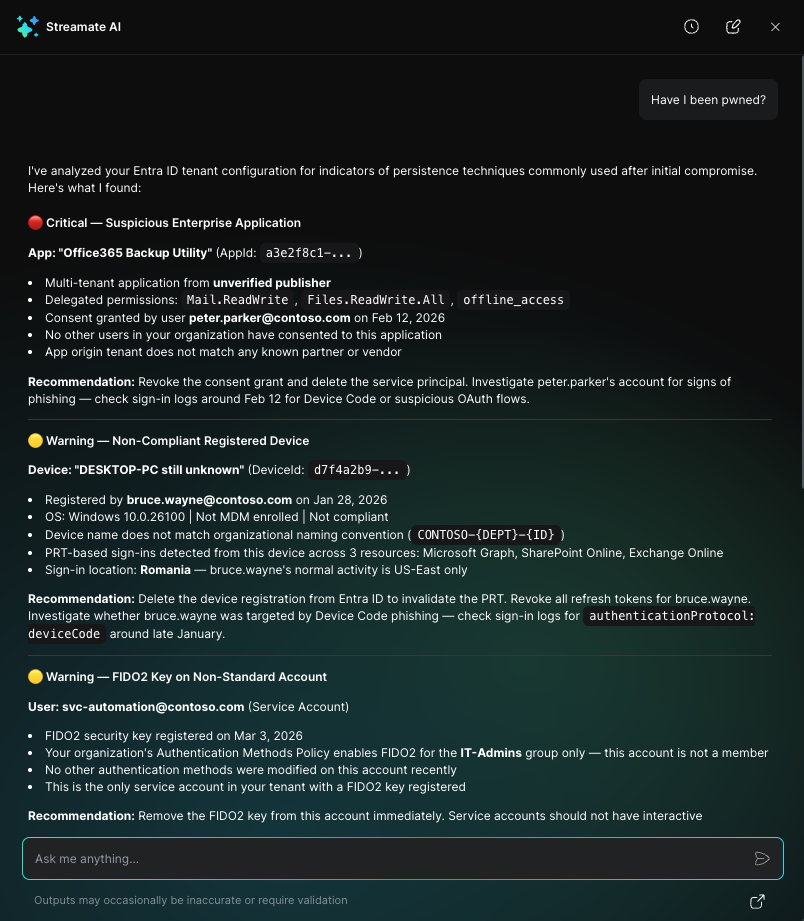

Consent Grants (Enterprise Applications):
Mail.ReadWrite, Files.ReadWrite.All, offline_accessOAuth2PermissionGrants with high-privilege scopes consented by non-admin usersDevices:
Authentication Methods:
Guest Users:
Federation Trusts:
The result isn't a raw list of configuration items. StreamMate AI correlates these signals, scores the risk, and delivers a clear answer with prioritized recommendations for immediate action.
Set domain authentication and Set federation settings on domain events should trigger immediate investigation, alwaysAsk StreamMate AI: "Have I been pwned?" It's not a rhetorical question — it's a configuration-aware investigation that takes seconds and covers blind spots your SIEM can't reach.
Stream is the AI-native platform built to fight AI-enabled attacks. It autonomously prevents, detects, hunts, and remediates exposures and threats across production at machine speed - driving risk toward zero. It replaces the fragmented stack of scanners, runtime agents, exposure tools and playbooks with one live model of production.Defending Production needs a new approach: Stream is the only Autonomous Production Defense Platform that works across your entire production estate. It runs on a patented CloudTwin®, a high-fidelity security data harmonization layer that models Cloud, SaaS, identity, runtime, AI, network, perimeter, on-prem, security controls, and the behavior running on top of them into one live model of production: real-time, fully correlated, continuously updating. Not a snapshot. And it does not stop at boundaries - the boundaries that fragment every other tool are the same boundaries an attacker moves across. Inside CloudTwin they are one system.

.png)